Contact

mail@gemini-theme.com
+ 001 0231 123 32

Follow

Info

All demo content is for sample purposes only, intended to represent a live site. Please use the RocketLauncher to install an equivalent of the demo, all images will be replaced with sample images.


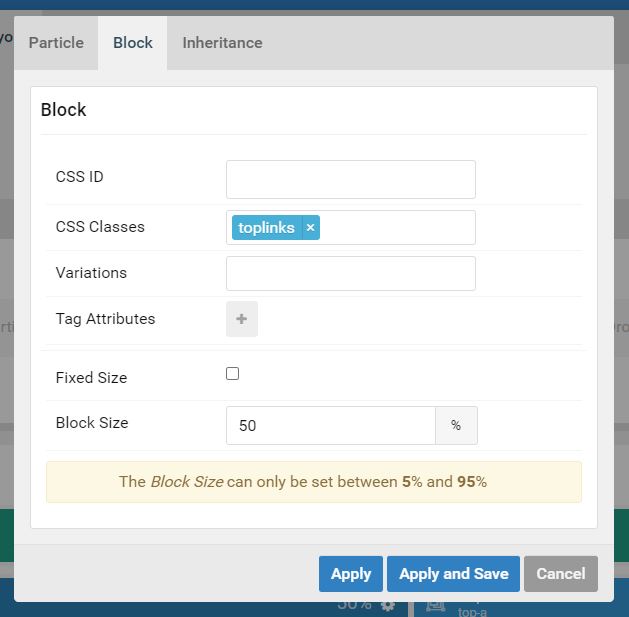
CSS Class to add to Particle in Gantry
toplinks

See Example at cc-lawrence.solutiosoftware.com

CSS for Overide.css
.toplinks .g-iconmenu > a  {color: #064373; border-left: 2px #064373 solid;}
.toplinks .g-iconmenu > a:hover {color: rgba(162,150,128,.75);}
    
Optional CSS for subpages
#g-top:not(.homelayout #g-top) {border-bottom: 2px solid #064373;}
Apply Class to Gantry Particle

HTML for Toplinks !!(USE CODEMIRROR)!!
 <div class="g-iconmenu">
            <a target="_parent" href="/news/bulletin" title="BULLETIN" class="g-iconmenu-item">
                <span class="g-iconmenu-icon fa fa-newspaper-o"></span>
                <span class="g-iconmenu-text">BULLETIN</span>
            </a>
            <a target="_parent" href="/sacraments/eucharist" title="MASS TIMES" class="g-iconmenu-item">
                <span class="g-iconmenu-icon fa fa-clock-o"></span>
                <span class="g-iconmenu-text">MASS TIMES</span>
            </a>
            <a target="_parent" href="/search" title="ONLINE GIVING" class="g-iconmenu-item">
                <span class="g-iconmenu-icon fa fa-heart"></span>
              	<span class="g-iconmenu-text">ONLINE<br/>GIVING</span>
            </a>
</div>