Contact

mail@gemini-theme.com
+ 001 0231 123 32

Follow

Info

All demo content is for sample purposes only, intended to represent a live site. Please use the RocketLauncher to install an equivalent of the demo, all images will be replaced with sample images.


Test Alert Article

Test

detailed information here


Class for New Parish Alert

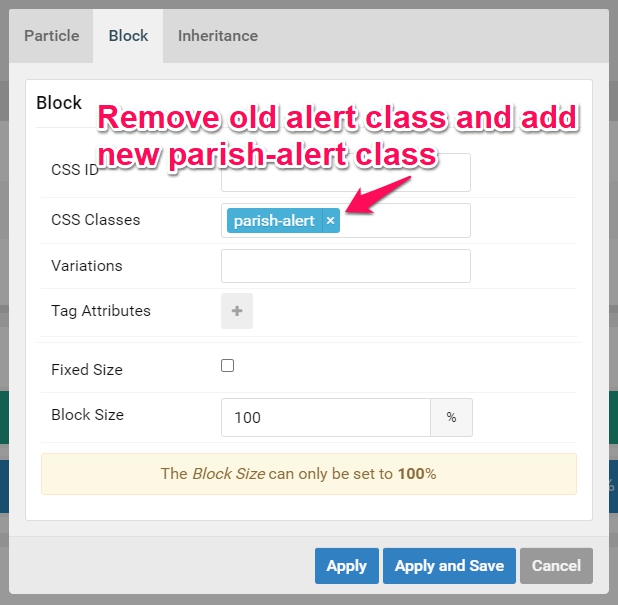
Remove the old alert class from the Alert particle in Gantry and add the new one in its place.
parish-alert

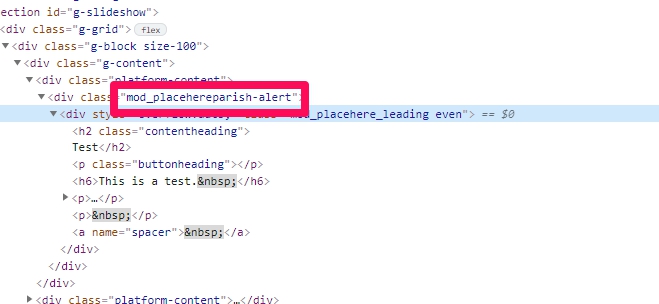
Note: if it doesn't work at first you may need to check that there is a space between the classes on the module. Sometimes they can bunch up which causes neither class to work. You can fix this by adding a space at the beginning of the "Module Class Suffix" box. **SEE IMAGE AT THE BOTTOM OF THE PAGE**

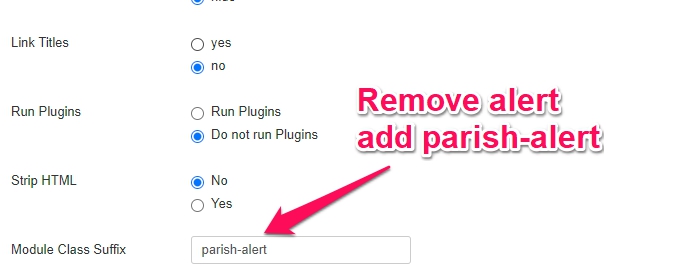
Places you will need to switch out the old "alert" class with the new "parish-alert" class.

In Gantry Particle

In Module Class Suffix

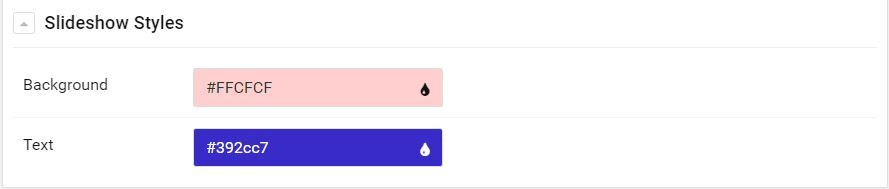
Now you will be able to change the Alert Modules Background and Text Color from within the Gantry-5 Style settings for the Slideshow Section

Error