
Outlines
- Create the Proper Outlines for the site. INSTRUCTIONS
- Add the Default CSS and JS for new site. INSTRUCTIONS
- Add the 'System Messages' particle to the Top section and underneath it add the 'Alert' particle
- Match up the Site Home Outline to the Mockup/Wireframe
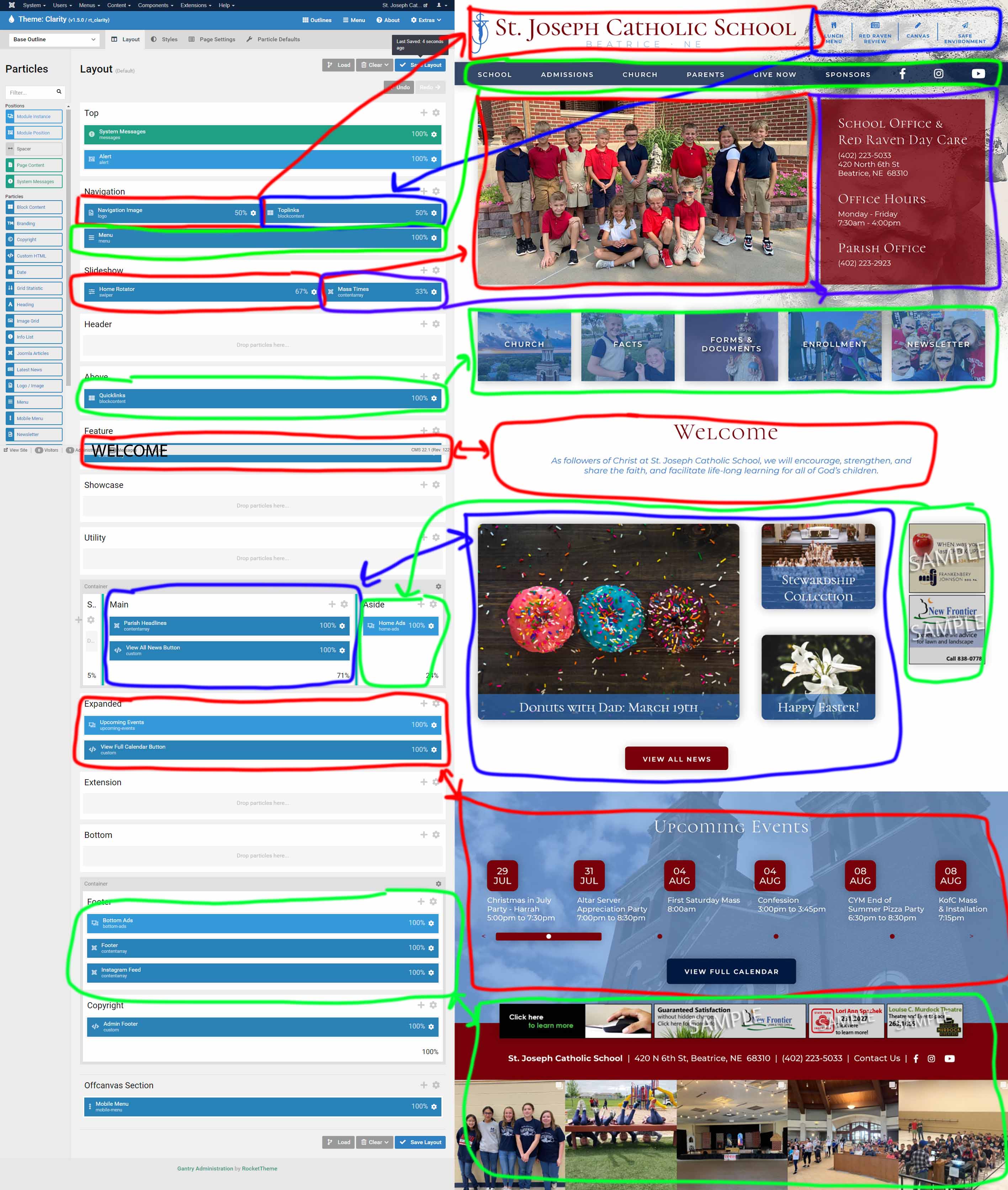
- If The item is a quicklink (toplinks, quicklinks, bottom-links, etc...) then it will be built with a 'Block Content' Particle.
- If the item is a Rotator it will be built with the 'Swiper' Particle.
- If you are placing ads they will be placed with a 'Module Instance' particle and you will place the corresponding module number within the particle.
- If the item is Parish Headlines it will be built with the 'Joomla Articles' particle.
- The footer is always a 'Joomla Articles' particle that is linked to the Footer article under the category 'Homepage Module Articles'.
- Welcome, Mission, or other text will be placed on the site with the 'Joomla Article' particle.
- View All News Buttons, and View Full Calendar Buttons, etc... will use the 'Custom HTML' particle and have the class 'submod-button'.
- RokMiniEvents3 - Upcoming Events will be made with the 'Module Instance' particle and link to the RokMiniEvents3 upcoming events module number.
- Add Correct Class from styles site to each particle based on Mockup/Wireframe
- For each outline on the site you will need to add Body Classes under the Page Settings for each Outline.
Base Outline:
Base Outline is set to 'site-1' so that it pulls information for the Error Page.The Class 'site-1' is to group the home outline and the sub outline for the parish website. They are then differentiated by using the 'site-home' and 'site-sub' classes. This is true for the school as well using 'school-1' instead of 'site-1'.